

Every once in a while, a customer deployment comes along that makes us stop and say:
“Yes. This is exactly what these features were built for.”
Recently, one of our enterprise customers shared a planned architecture for a secure file-transfer workflow using Syncplify Server! v7 together with Syncplify R2FS!, and we were genuinely impressed by how clean, safe, and flexible the design is.
With their permission (and with all identifying details removed), we’re sharing this use-case because it perfectly demonstrates how Syncplify’s VFS, Virtual Folders, SyncJS, and R2FS! can be combined to build a zero-trust ingestion pipeline without any extra middleware... and without exposing internal storage to the network.
The Problem
The customer needed to solve a very common (yet very tricky!) requirement:
External clients must upload files
Files must be scanned before reaching internal storage
Internal storage must never be exposed directly
Outbound files must still be accessible immediately
Upload workflows may use temp files, renames, or staging folders
The storage subnet must not accept inbound connections
No NAT or port-forwarding to internal storage should be required
In other words: Allow file transfers, but never trust them, and never expose the backend.
The Key Idea
Instead of letting users write directly to backend storage, the customer designed a pipeline where:
Files land on the Syncplify Server! local disk
A script scans them
Only clean files are moved to backend storage via R2FS!
Backend storage is exposed back to the user as read-only
This turns Syncplify Server! into a security gate, and R2FS! into a secure outbound bridge to internal storage.
The crucial detail here is that R2FS! connects outbound from the storage side, meaning:
No inbound firewall rules are required
No NAT is required
No port forwarding to the storage network
The storage subnet remains completely private
This is the main reason R2FS! exists.
You can read more about this architecture here:
https://www.syncplify.com/syncplifyr2fs
High-Level Architecture
At a high level, the system works like this:
Users upload into a staging area on Syncplify Server!
Event handlers trigger scanning
Clean files are copied to an R2FS! VFS
R2FS! delivers them to internal storage through an outbound-only connection
Internal storage is exposed back to the user as outbound folder
The most important rule in this design is: No file can ever reach internal storage unless the script allows it, and the storage network never accepts inbound connections.
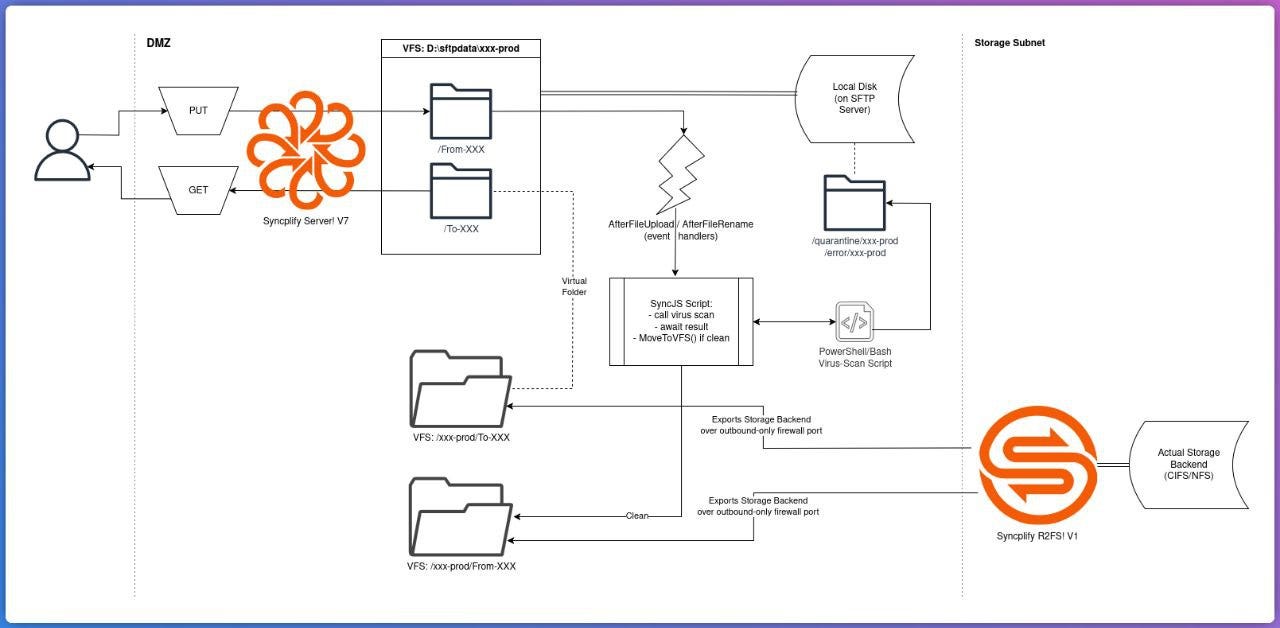
Why R2FS! Is Critical Here
In a traditional setup, the Syncplify host would need direct access to backend storage via:
SMB/CIFS
NFS
mounted disk
VPN
port forwarding
firewall rules
All of these increase the attack surface.
With Syncplify R2FS!, the model is reversed.
The storage system connects outbound to Syncplify Server!, not the other way around.
This provides several major security benefits:
No inbound connectivity to the storage subnet
No NAT rules required
No port forwarding required
Storage can sit behind a strict firewall
Backend can even be in a different network zone
Syncplify Server! never needs direct file-system access to the actual data storage
This makes R2FS! ideal for:
DMZ-to-internal storage bridges
zero-trust architectures
segmented networks
high-security environments
Exactly the scenario this customer implemented.
Using Virtual Folders to Separate Inbound and Outbound
The user’s home directory is built using:
Local disk VFS for inbound files
R2FS! VFS injected as a virtual folder for outbound files
This ensures:
Uploads go only to staging
Internal storage is read-only for the user
Backend storage is never written directly
Because virtual folders currently mount entire VFS objects, the customer created two VFS per customer:
one for inbound staging
one for outbound R2FS!
This is only a convenience limitation, not a functional one, and the design remains very clean.
Handling Real-World Upload Workflows
Real clients rarely upload files in one step.
Common patterns include:
.tmp during upload
write -> rename
upload to /temp
move after complete
If scanning runs too early, the file is incomplete.
If scanning runs too late, unsafe data could pass through.
The solution was to trigger the script on:
AfterFileUpload
AfterFileRename
and ignore temporary files.
Example logic:
Ignore .tmp
Ignore /temp/
Scan only finalized files
This ensures scanning runs exactly once, at the right time.
SyncJS Automation + External Scanner
The entire secure move to backend storage is handled with SyncJS, including calling an external scanning tool.
Example script:
var originVfs = GetCurrentVFS();

if (originVfs == null) {
  Exit();
}

var fname = Session.GetRelPath();

// ignore temp files

if (fname.endsWith(”.tmp”) || fname.indexOf(”/temp/”) >= 0) {
  Exit();
}

// run external scanner (example)

var scan = Run(”powershell.exe”, “-File C: \\scripts\\ scan.ps1\”“ + fname + “\”“);

if (scan.ExitCode != 0) {
  Log(”Scan failed, file not accepted”);
  Exit();
}

var recipientVfs = new VirtualFSByName(”r2fs_vfs1”);

if (recipientVfs != null) {
  var resp = originVfs.CopyToVFS(fname, recipientVfs, fname);
  if (resp.Ok()) {
    Log(”File copied to R2FS VFS”);
  } else {
    Log(”Error: “+resp.ErrorMsg());
  }
}
This script:
avoids uploads that are not yet complete
runs an external scan
copies only clean files
sends them to the R2FS! VFS
lets R2FS! deliver them to internal storage
No middleware required.
Security Properties of This Design
This architecture guarantees:
No un-scanned file reaches backend storage
Internal storage never accepts inbound connections
No NAT or port forwarding required
Syncplify is the only exposed service
Backend stays isolated
Any scanner can be used
Upload workflows remain compatible
Outbound files are immediately visible
This is effectively a zero-trust file gateway built entirely with Syncplify software.
Where This Pattern Works Best
This architecture is ideal for:
Media ingest pipelines
Broadcast / MAM systems
Financial data exchange
Healthcare file intake
Government secure transfers
Segmented enterprise networks
Air-gapped storage environments
Zero-trust infrastructure
Final Thoughts
We love seeing customers use Syncplify products this way.
This deployment combines:
Virtual File Systems
Virtual folders
SyncJS scripting
Event handlers
External scanning
R2FS! outbound storage bridge
to create a secure, elegant, and fully automated file pipeline, without adding extra servers, without opening firewall holes, and without exposing internal storage.
Exactly the kind of architecture these features were designed for.