

Search “cloud SFTP” and you’ll get a dozen confident answers. Almost none of them agree with each other.
That’s not an accident. “Cloud SFTP” isn’t one thing. It’s three very different architectures wearing the same marketing label, and the differences between them matter a lot more than most vendors want you to notice.
If you’re evaluating a cloud SFTP solution, you need to know which one you’re actually looking at.
Flavor 1: “Cloud” just means “on a VM”
The oldest trick in the book. Take a normal SFTP server, install it on an EC2 instance or an Azure VM, call it “cloud SFTP.”
Nothing about the security model changes. You still patch it. You still manage the firewall. You still own every CVE that lands on it. The only thing that moved to the cloud is the hardware. This isn’t wrong, exactly, but it’s just not what most people mean when they ask for a managed cloud SFTP service.
Flavor 2: The vendor hosts it, and your files
This is what most people actually get when they sign up for a “cloud SFTP” or “SFTP-as-a-service” product today. The vendor runs the server. Convenient. But look closer at where your files actually live during and after a transfer, and the picture gets less comfortable:
Your files are stored on the vendor’s infrastructure, at least transiently, often persistently.
To connect your own storage, you typically have to grant the vendor access into it: an S3 bucket policy, a service account, an API key with read/write scope.
If your storage isn’t cloud-native (an on-prem NAS, a SAN, a file server sitting in your own data center) you’re usually out of luck. Cloud-only storage backends are the norm, not on-prem.
And on the storage side, inbound firewall rules are still the default, because something still needs to reach in and grab the files.
None of this makes a vendor incompetent. It’s just the architecture almost everyone builds, because it’s the easiest one to build. But “managed” quietly became a synonym for “someone else has access to your data,” and that trade got baked-in so early that nobody even questions it anymore.
Flavor 3: The one nobody’s really built yet (except…)
Here’s the question worth sitting with: why does a managed file transfer service need access to your files at all?
Not “why does it need to move them,” obviously it does, that’s the job. The question is why the vendor’s cloud needs to be a place your files sit in, or are even briefly accessible from. What if the cloud component only ever relayed a protocol, never held a byte of your data, and the connection into your storage only ever went outward, meaning nothing on the internet ever needs an open inbound port to reach it?
That’s not a rhetorical question. It’s the design question we’ve been working through at Syncplify for our upcoming sftp.cloud service, and we’ve already shared a piece of it: files that are never stored in our cloud, not during transfer, not at rest, not ever, paired with a lightweight connector that opens an outbound-only connection from wherever your storage actually lives.
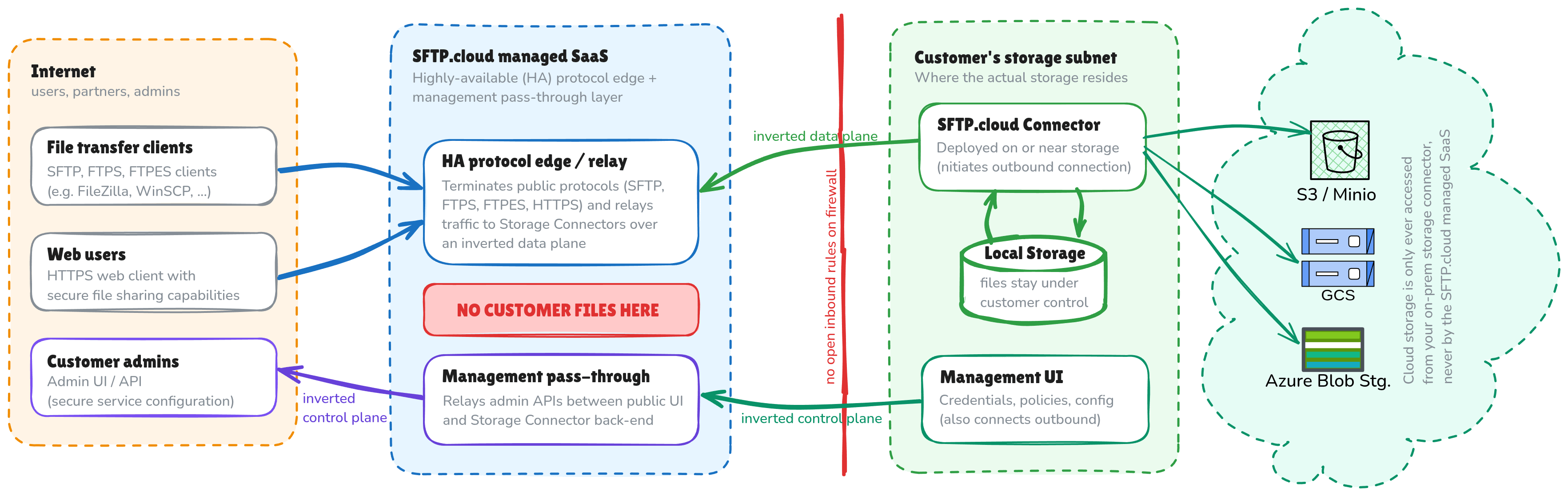
We’re not ready to walk you through the full architecture yet. But we’ll say this much: if your current “cloud SFTP” vendor needs an inbound rule on your firewall, or needs permission to reach into your storage, that’s not an inherent requirement of the category. It’s just the version that got built first. And SFTP.cloud is designed to subvert that requirement.
What to actually ask
Next time someone pitches you a cloud SFTP or managed SFTP product, three questions cut through the marketing fast:
Does my data ever sit on your infrastructure, even temporarily?
What access do you need into my storage, and is it inbound or outbound-only?
Does this only work with cloud storage, or can it use on-prem systems too?
The honest answers will sort the three flavors above faster than any feature comparison page.
We’re building sftp.cloud to answer all three of those questions the way we think they should be answered. We just opened up early access to the first 100 people who want in: reserve your spot at sftp.cloud. Prefer to just keep an eye on things for now? Subscribe to this blog instead.